
A good website check is slow work. Someone clicks through every page on a laptop and then on a phone. They take screenshots. They try to remember the right guideline for colour contrast, cookie consent or page speed. Then they write it all up. A proper job takes days, and two people doing it rarely find the same things.
AI should be able to help. So we built a crew of AI agents that checks a website against published standards, on desktop and on mobile. Every finding comes with its evidence and the rule it breaks. Then we ran it on one of our own products, and recorded every step.
The story in 60 seconds. Want the full version, with the agents at work? Watch the 3-minute video.
AI on its own makes things up
Before building anything, we tested five open models on real audit tasks where we already knew the answers. We ran them locally on a Mac. The results were clear.
- They invented features. Asked whether a website platform could do something natively, the models scored between 0.62 and 0.93. The wrong answers weren’t “I don’t know”. They were confident descriptions of features that don’t exist.
- They missed the cookie problem. On one test site, Google Tag Manager loaded before the cookie consent default. A simple script spots that in a second. Only one of the five models caught it.
- One model skipped the tools entirely. Asked to look up page data, it answered without calling the tool and made up the numbers.
Then we gave the same models the published standards to work from. On the platform questions, all five scored 1.00. On the search questions, four of five did. The models hadn’t got smarter. They’d been given the rules. Grounding mattered more than model size. That one result shaped everything else we built.
Three ideas
1. Scripts measure, agents explain
The agents never browse the site themselves. A script opens every page in Chrome at desktop size (1440×900) and phone size (390×844). It takes screenshots, reads the page code, runs an automated accessibility scan, walks the page with the keyboard, and watches every network request. A separate script measures speed on a fast connection and on a throttled phone connection, three times each. Those are the facts. The agents read them through tools and decide what they mean.
2. Published rules, not AI memory
Each agent is handed the standards it must apply, each rule with an ID and a link to its source. Google’s search and consent mode guidance. WCAG 2.2 AA for accessibility. Core Web Vitals for speed. Recognised usability heuristics for design and site structure. Every finding has to cite a rule ID. If a finding can’t name its rule, it doesn’t ship.
3. Checks on the checkers
After each agent finishes, a coverage check (a script, not AI) reads the run log and confirms the agent made every check it was supposed to, on every page, at both screen sizes. If it skipped some, it’s sent back once with the list of what’s missing. Then a reviewer agent goes through every finding. It throws out anything without evidence or a rule, merges duplicates and corrects severities. Finally, a person signs off before anything reaches a client.
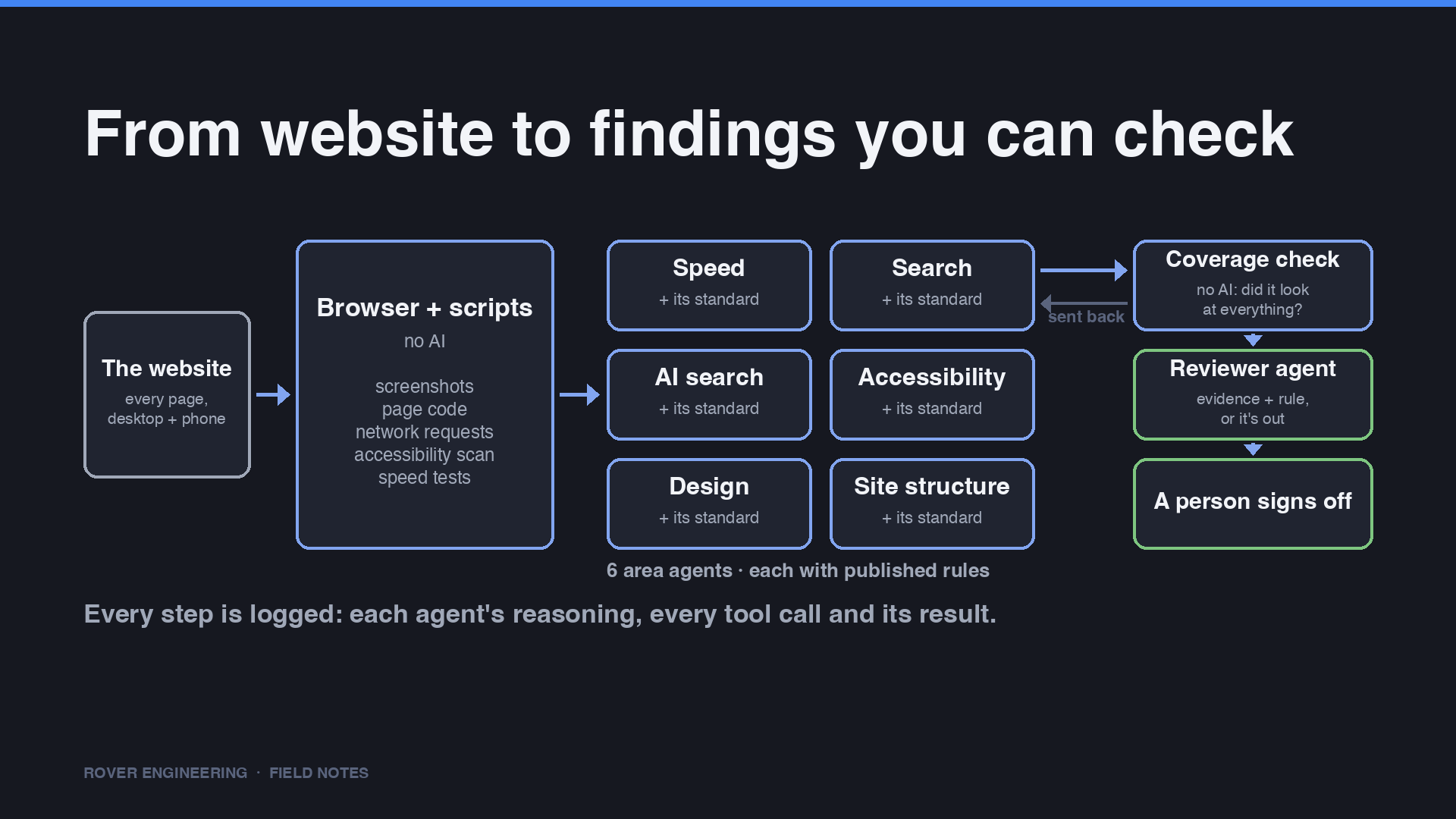
The crew
We used CrewAI to coordinate the agents. Each one has a single job:
- Performance: load times, layout shift and page weight against Core Web Vitals.
- SEO and analytics: page titles, descriptions, share tags, and whether tracking respects cookie consent.
- AI search: how well AI assistants can understand and quote the site: structured data, crawler rules and clear facts.
- Accessibility: the automated scan and keyboard walk, measured against WCAG 2.2 AA.
- UI and UX: looks at the screenshots for consistency, clarity and mobile layout.
- Information architecture: menus, footers, links and whether every page can be reached.
- Platform fit: whether requested features can be built natively on the site’s platform (it only runs when there’s a feature list).
- Reviewer and writer: the reviewer checks every finding; the writer turns the survivors into a plain-English summary and a short list of priorities.
Before any of that, a crawler script reads the site’s sitemap and menus and proposes a list of pages. A person trims it to the pages that matter.
The test: our own product
We ran the full crew on Calendar Sync, one of our own products. Four pages: Home, Appointment scheduling, Privacy policy and Terms of use. Each one at desktop and phone size. Six area agents ran; platform fit sat this one out because there was no feature list. The agents ran on Claude through our existing subscription, so there was no per-token bill.
The whole run took about thirteen minutes. Each area agent took about a minute. The design agent took longer, because it opens screenshots, and the reviewer took under two minutes to check 39 findings.
Watching it think
Every step is logged: each agent’s reasoning, every tool call and what came back, every coverage check, every reviewer decision. We turned that log into an animated replay. The architecture lights up as each part works, the conversation between agent and tools scrolls past, and the screenshot the agent is looking at appears alongside. You can see exactly why each finding exists.
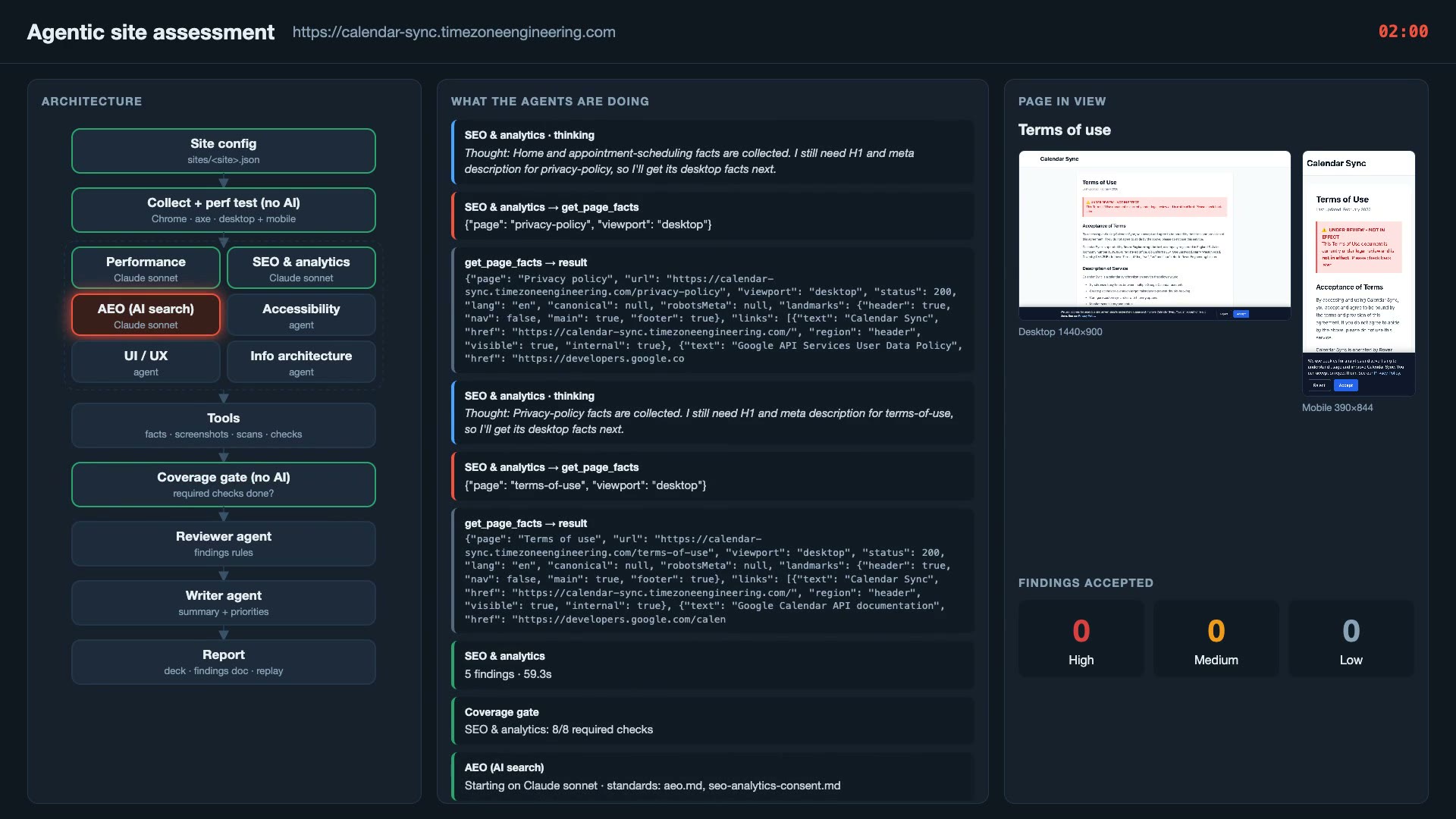
Two moments stood out.
The design agent skipped screenshots. It was meant to open eight screenshots, one per page at each size. It opened one and wrote the rest of its findings from the page data. The coverage check caught it and sent it back. On the second pass it opened two more, then stopped again. It finished with three of eight. We know exactly which five it missed, because the coverage check lists them.
So we stopped leaving it to the agent. Looking at screenshots is now a step of its own, driven by a script like the measuring is. The model is shown every screenshot, one at a time: the first screen and the whole page, on desktop and on phone. We check that it really opened each image, and if it didn’t, it tries again. If any screenshot still hasn’t been looked at, the run stops. The design agent then works from all of those reviews. On the re-run it covered all sixteen screenshots in about a minute, and passed its coverage check first time.
The reviewer threw out four findings. None of them were wrong. In each case, two agents had spotted the same problem from different angles. The design agent and the accessibility agent both flagged pale text on the blue pricing block, with the same contrast measurements. The reviewer kept the better-evidenced one and merged the rest.
The cookie moment
This is the finding that convinced us the approach was right. Reading the page code, an agent will tell you “Google Tag Manager loads before the consent default: high risk”. That’s a guess about what the code will do. So we added a measured test. The browser loads each page fresh, with no cookie choice made, and records every tracking request along with its consent state.
On Calendar Sync, Google Analytics behaved correctly. Before a choice, it sent only the cookieless “denied” ping it’s allowed to send. But on the home page, with the cookie banner still showing, Google advertising requests fired before anyone clicked anything, most likely from an embedded video. Code reading would not have told us that. The measurement did.
What it found
The reviewer kept 35 findings. The writer’s headline was blunt:
Calendar Sync works well on a computer, but ad tracking runs before visitors choose, some text is hard to read, and parts of the site are hard to find.
It turned the 35 findings into eight priorities, each with an effort estimate. The top five:
- Stop advertising requests firing before the visitor chooses. A consent risk, on the home page.
- Make faint text readable and make links stand out. Light-blue text on blue, and links marked by colour alone. A quick win.
- Make every page reachable. No page linked to Appointment scheduling, footers differed from page to page, and there was no Contact link. Another quick win.
- Fix keyboard use. No skip link on two pages, and the cookie banner covers footer links when they get keyboard focus.
- Speed up the home page on slow phones. 3.3 seconds to show anything on a throttled connection, with outside scripts making up most of the page weight.
It also listed what works well: fast on desktop, almost no layout shift, a cookie banner with a real Reject button, FAQ structured data and an llms.txt file for AI assistants. Most of the fixes are small.
What went wrong along the way
The first runs weren’t clean, and each failure became a safeguard.
- An agent skipped screenshots, so we added the coverage check and the automatic follow-up.
- A follow-up came back without rule IDs, and the reviewer rejected all twelve of its findings. Annoying, but it proved the reviewer works.
- An agent marked something it “couldn’t confirm” as high risk. We added a rule that unconfirmed findings can never be high, and built the measured consent test.
- Automated accessibility scans only catch part of WCAG. Anything that needs a human eye is reported as “to check”, at low severity, rather than presented as fact.
Choice of model
Because the agents work from supplied standards and measured facts, the model is a setting, not a foundation. The crew runs on Claude through our subscription by default. It can also run entirely on open models on a Mac (Qwen3 for the tool-using agents, Gemma 3 for screenshots), free and offline, just slower. We’ve also tested Kimi K3, a hosted open model, which, given the standards, scored full marks on every one of our evals and called the tools correctly. This is the same direction as our chatbot’s move to open models and our local LLM tests on a Mac mini: pick the model per job, and don’t let one provider become a dependency.
What we learned
- Grounding beats model size. Give a model the rules and the facts, and it does well. Leave it to its memory, and it guesses, confidently.
- Let scripts do the measuring. Anything a script can measure, a script should measure. The agents are far more useful explaining facts than discovering them.
- Check the checkers. Agents skip work and repeat each other. A simple coverage check and a strict reviewer catch most of it, and a person catches the rest.
- Show the working. Being able to replay every step is what makes the findings trustworthy. Nobody has to take the AI’s word for anything.
Want your site checked?
The crew works on any website, on any platform, and produces a findings report with evidence and sources for every point. If you’d like us to run it on your site, get in touch.