
Like most teams building with AI, we lean heavily on a handful of frontier providers: Anthropic, OpenAI and Google. Their models are excellent and we’ll keep using them. But we don’t want every AI feature we build, for ourselves or for clients, to depend on three US companies’ APIs, pricing and policies. So we’re experimenting with open-weight models running in places we choose: on our own laptops and desktops (we recently tested the top local LLMs on a Mac mini), and on European cloud platforms like IONOS.
Experimenting properly needs somewhere real to experiment. Benchmarks and toy demos don’t tell you how a smaller model copes with messy scraped content, sloppy visitor questions, or a provider whose API is “compatible” but not identical. A production workload does. So we turned our own RAG chatbot, already live on two websites, into our test bed for open models.
The story in 50 seconds. Want the full version, with the chatbot answering live on our website? Watch the 2-minute video.
Why our chatbot became the test bed
When we moved our RAG chatbot platform from Azure to IONOS Cloud, we left one thing out on purpose. The application, the databases, the vectors and the backups all moved to a UK data centre run by a provider headquartered in the EU. The AI layer did not: every answer and every embedding still came from OpenAI. We said so at the time, and we said the next step was to evaluate open-weight models on IONOS AI Model Hub against our OpenAI baseline.
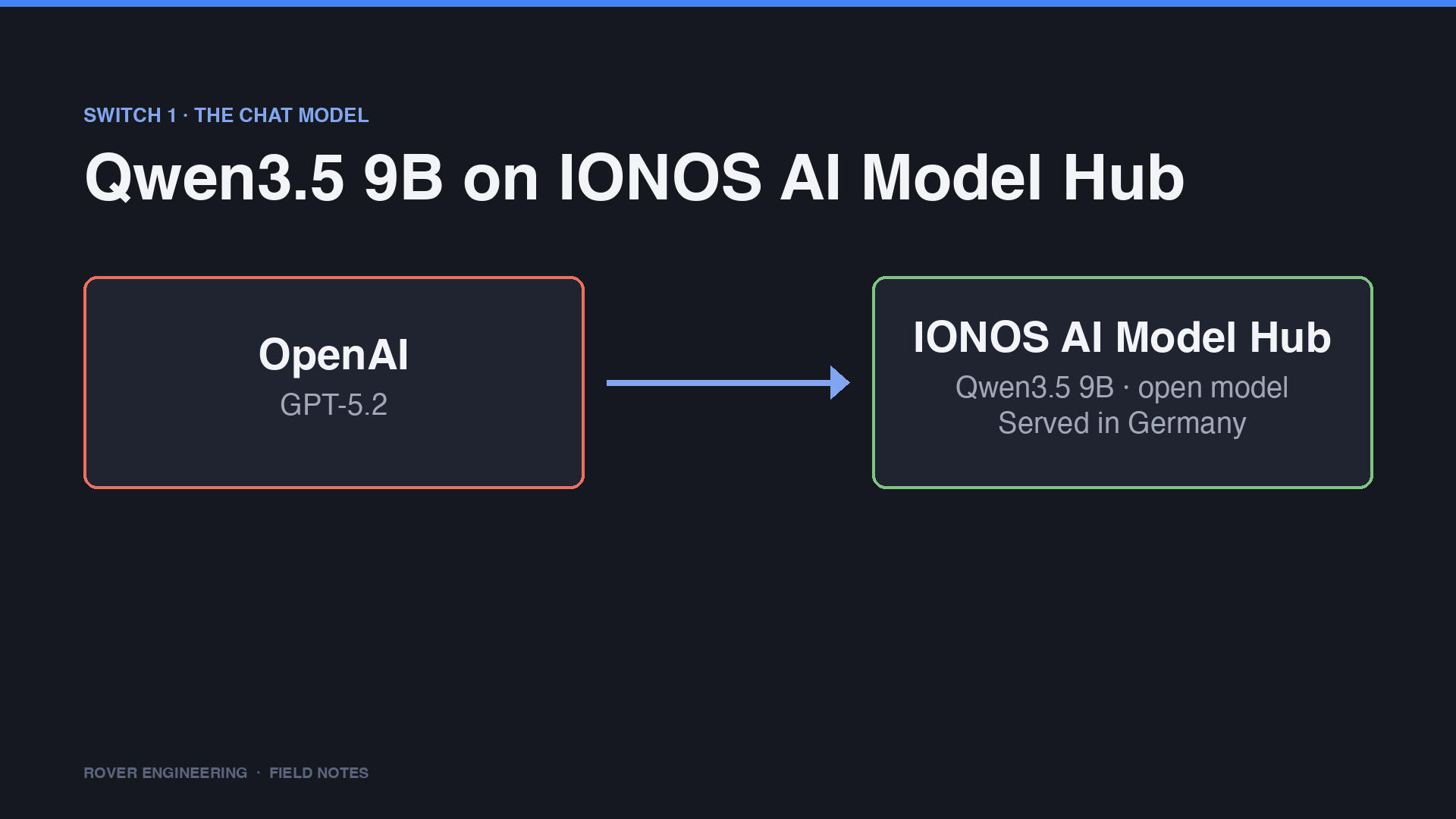
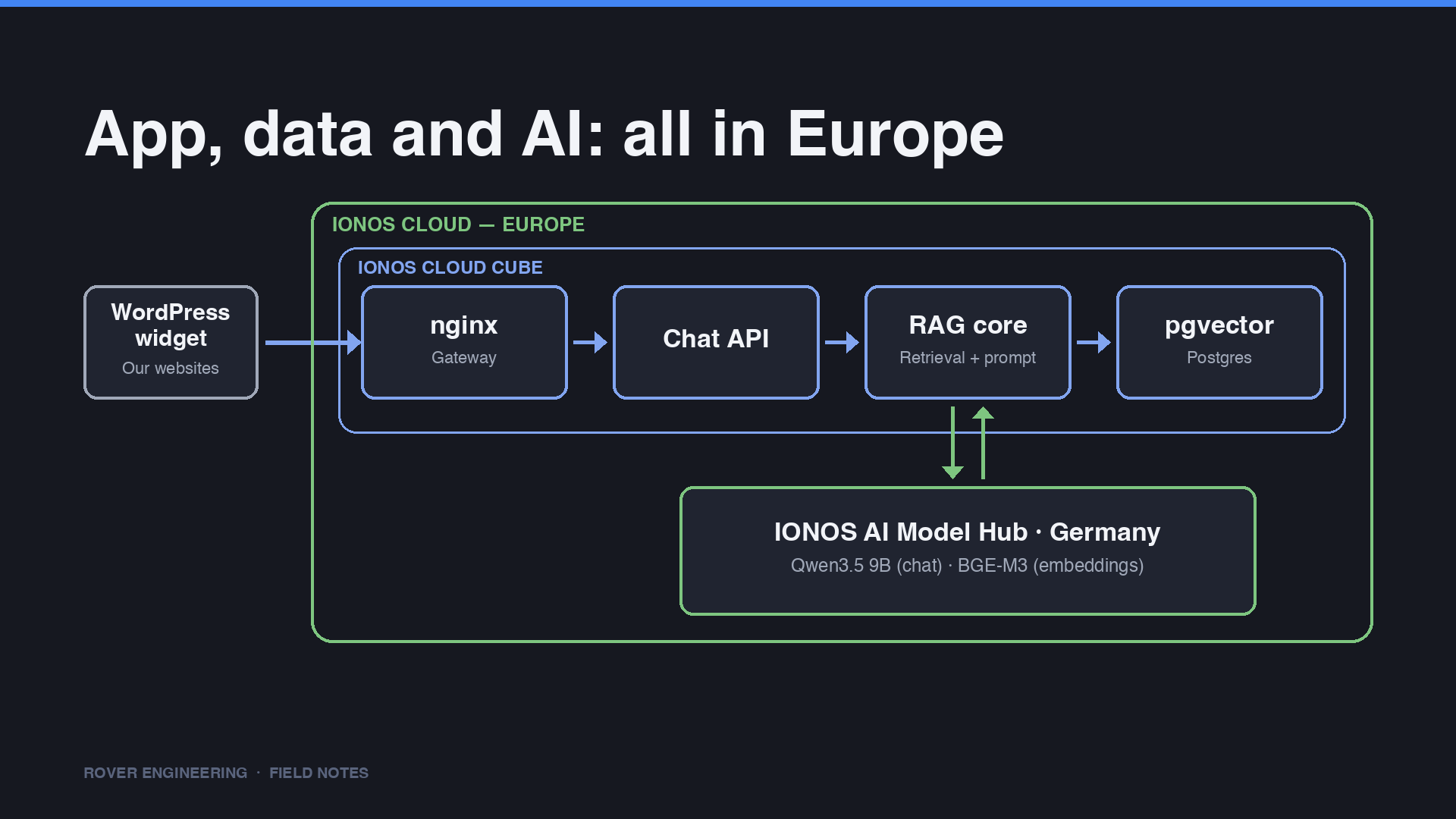
That work is now done. The chatbot writes its answers with Qwen3.5 9B and searches its knowledge bases with BGE-M3, both served by IONOS AI Model Hub in Germany. No request leaves European infrastructure any more. This is the story of the two switches, why we kept them separate, and the surprises hiding behind the words “OpenAI-compatible”.
Two model calls, two very different risks
For anyone who missed the first post: the platform is an AI assistant that answers visitors’ questions using each client’s own website content. It makes two kinds of model call. An embedding model turns text into vectors, both the knowledge we store for each client and every question a visitor asks. A chat model writes the reply, using the closest-matching knowledge as its source material.
On paper both moves looked the same. Model Hub accepts OpenAI-style requests, so we could keep the OpenAI client library, give it a new address and a new token, and choose new models. In practice the two calls have very different risks.
Swapping the chat model doesn’t affect any stored data. If the new model writes worse answers, you change a setting back and the old behaviour returns.
Swapping the embedding model is a data migration. Vectors from different models can’t be compared, so every vector we had stored needed to be produced again. Our new vectors were also a different size from the old ones, so the database column itself had to change. In the Azure move we kept the existing embedding model precisely so every stored vector would stay valid. This time we couldn’t avoid it.
So we did inference first, with embeddings still on OpenAI, and treated embeddings as their own planned migration afterwards.
Part one: the chat model
Choosing a model
The first post mentioned “Llama-class chat”. By the time we started, IONOS had put Llama 3.1 8B on its retirement path and named Qwen3.5 9B as the replacement, so that’s what we evaluated. A larger Mistral model and Llama 3.3 70B stayed in reserve in case the smaller model’s answers weren’t good enough. Since the model is just a setting, trying one of them would have meant no code change.
We set the switch up so that the presence of a Model Hub address is what turns IONOS on. Remove the address and the service goes straight back to OpenAI. Rolling back is a configuration change, not a deployment.
We tested Qwen against a set of real visitor-style questions about our own site: overviews, contact and careers questions, things the site doesn’t cover, off-topic requests, sloppy phrasing and multi-turn follow-ups. We judged the answers on grounding, usefulness, how they handled noisy scraped content, refusals, tone, and whether any of the model’s reasoning text leaked into the answer.
Compatible doesn’t mean identical
The requests were compatible. The behaviour, in several ways, was not.
- The model thinks by default. Qwen3.5 runs a reasoning step before it answers unless told not to. For a website assistant that step costs time and money, and it can use up the whole output budget before the real answer starts, leaving the visitor with an empty reply. Whenever the service talks to Model Hub, reasoning is now off by default.
- The default answer length is tiny. OpenAI doesn’t need an output limit. Model Hub, if you don’t set one, cuts the answer off at 16 tokens. We now set a sensible limit and log why each reply ended, so any answer cut short by the limit shows up in the logs.
- Only one system message is allowed. We used to hand the retrieved knowledge to the model as a second “system” message, separate from the main instructions. Qwen on Model Hub rejects that with an error and an empty response body, which took longer to find than we’d like to admit. Retrieved knowledge now goes at the start of the visitor’s latest message, under a short heading, and the system prompt stays single and stable. A stable system prompt has a side benefit: Model Hub caches repeated prompt prefixes.
- Errors look different. An expired IONOS token comes back in IONOS’s own error format, not OpenAI’s. We now report that case plainly as an invalid or expired token and don’t retry it. Rate limits and server errors are still retried with backoff, and the wait follows what the server asks for.
Letting the model write Markdown
The biggest visible change was the reply format. Our old prompt asked the model to write its answer as HTML and CSS, which we streamed straight into the chat widget. That relied on the model being good at writing markup, and Qwen3.5 9B is a much smaller model than GPT-5.2. It treated every answer like a small web page, with its own colour scheme, invented banners and sometimes whole stylesheets. Some of the markup even came through as visible raw code.
We could have kept adjusting the prompt until the smaller model behaved. Instead, we moved the formatting job. The model now writes plain Markdown, which smaller models handle well, and our backend converts it to HTML with a standard Markdown library. Along the way it undoes a few habits we saw in the output, such as wrapping the whole answer in a code block.
There is a trade-off. Markdown can’t be reliably converted until all of it has arrived, so the backend now waits for the complete reply and sends it in one go. The answer arrives all at once rather than word by word.
Closing a long-standing security gap
The switch to Markdown also fixed something that had bothered us for a long time. Letting an AI write HTML that goes straight into a web page means the model decides what markup runs on our clients’ websites. Its input includes scraped web content and whatever visitors type, which is exactly where prompt-injection attacks hide. A well-placed instruction could make it produce a malicious link, a fake form, or code that runs in the visitor’s browser.
A legitimate Markdown answer never needs HTML, so we can be strict. One detail caught us out, though: Markdown itself allows raw HTML, and most converters pass it straight through. Asking the model for Markdown doesn’t make anything safe on its own.
So every converted reply now goes through an allowlist sanitiser:
- Only basic formatting survives: headings, paragraphs, lists, emphasis, quotes, code and tables.
- Styles, scripts, forms, frames, images and event handlers are removed.
- Links can only point to ordinary web, email or phone addresses, and can’t reach back into the page that opened them.
Tightening the prompt
We also rewrote the default system prompt to be explicit, because smaller models drift more readily than frontier ones. Answer only about this website. Use only the information provided. Say when you don’t know instead of guessing. Keep the formatting simple.
Part two: the embeddings
Why BGE-M3
Model Hub offers a small set of embedding models, and BGE-M3 was the only one that met all our requirements:
- IONOS names it the successor to the BGE Large model it was retiring, so choosing BGE Large would have meant a second migration within weeks.
- It accepts long inputs, so our existing chunks of a few hundred words fit without re-chunking every client’s knowledge base.
- Its 1024-dimensional vectors fit comfortably within the limit of the HNSW index pgvector uses for fast search.
The alternatives each failed one of those tests. One accepts only about a hundred words of input, which would have forced a full re-chunk. Another produces vectors too large to index.
Why this couldn’t be a settings change
Our old vectors had 256 dimensions; the new ones have 1024. pgvector can’t convert a column from one vector size to another. Comparing a question embedded by one model against knowledge embedded by the other either fails outright or returns confident nonsense. The questions and the stored knowledge had to switch to the new model at exactly the same moment.
The knowledge itself is small: a few hundred chunks across a handful of client knowledge bases. Re-embedding it is quick. The careful part was doing it without breaking search while it happened.
A shadow-column migration
We wrote a small migration tool that works in stages. Each stage checks the previous one has finished and refuses to run out of order.
Prepare adds a second, empty vector column of the new size next to the existing one. The live chatbot keeps reading the old column throughout.
Backfill reads every stored chunk, embeds it with BGE-M3, and writes the result into the new column. It sends requests in batches, paced below Model Hub’s rate limit. If a batch fails, the tool skips it and can retry it later; an expired token stops the run immediately. We embed the stored chunks exactly as they are, without re-chunking the source pages, so every row keeps its identity.
Check counts any rows still missing a new vector or holding one of the wrong size, broken down by client. The tool only reports ready when both counts are zero.
Finalize builds the search index on the new column ahead of time, so the switchover itself takes moments.
Cutover happens in a short window. We pause knowledge edits, run one last catch-up backfill, and then, in a single database transaction, swap the two columns’ names so the new vectors take the old column’s place. The embeddings and data services then restart together on the new model, so questions and stored knowledge change models at the same moment.
Two details mattered more than we expected. The index names had to be swapped as well as the columns. Our data service creates its search index on startup if an index with the expected name doesn’t exist, so a mismatched name could have quietly produced a second, duplicate index on the live column. And the old column had to stop being required. After cutover, new knowledge only gets a new-model vector, and an old column that still demanded a value would have rejected every upload.
The old vectors stay in place for a trial period. While they exist, rolling back is the same swap in reverse plus a configuration change. The one known gap is that knowledge added after the cutover has no old-model vector and would need re-adding. Deleting the old column is a separate step that has to be explicitly confirmed, and we won’t take it until we’re sure.
Guard rails
The vector size now has to match in three places: the embeddings service, the data service and the database column. The data service checks the size of every vector before writing it. A configuration mistake now produces an error that says which size it expected and which it got, instead of a confusing database failure. We also shortened the embeddings service’s timeouts and reduced its retries, so even a slow batch, retries included, finishes within the time the data service is prepared to wait.
Lessons we’re carrying forward
- “OpenAI-compatible” describes the request format, not the behaviour. Defaults, limits, error formats and which message types are allowed can all differ. Test each one before you go live.
- Turn off reasoning unless you need it. For short answers grounded in retrieved content, it mostly adds delay and cost, and it can leave visitors with empty replies.
- Never put model-written HTML straight into a page. Let the model write Markdown, convert it yourself, and sanitise the result against a strict allowlist. Markdown can carry raw HTML too, so the format alone doesn’t protect you. Smaller models are better at simple formatting than at styling, and you decide what can end up on the page instead of the model, even if you give up word-by-word streaming.
- Ship the chat model and the embedding model separately. One is a setting you can flip back. The other is a data migration and deserves a plan, a rehearsal and a way back.
- Keep the old vectors until you’re sure. A shadow column costs some disk space and gives you a rollback measured in minutes.
- Put token expiry dates in the calendar. Model Hub uses tokens with a fixed lifetime. A sudden wave of authentication errors after a quiet period almost always means one has expired.
What’s next
This finishes the data-residency story we started with the Azure move. The application, its data and, now, its AI all run on European infrastructure. Next we’ll keep evaluating answer quality against the OpenAI baseline as Model Hub’s catalogue changes, and keep the larger models ready in case a client’s content needs them.
The same question set and grading criteria now give us a repeatable way to try other open models, including ones running locally on our own machines, against a real workload rather than a benchmark. That’s the experiment we’re most curious about next.
If you’re thinking about a similar move, whether that’s bringing your AI layer under European jurisdiction or adding a grounded assistant to your own product, we can start where we always do: an audit of your setup and a clear record of the decisions before anything moves. Get in touch.